

Android 17 Adds App Lock Feature to Protect Apps on Pixel Phones
Google’s latest Android 17 QPR2 beta introduces a new security tool that can lock individual apps behind biometric or pattern authentication
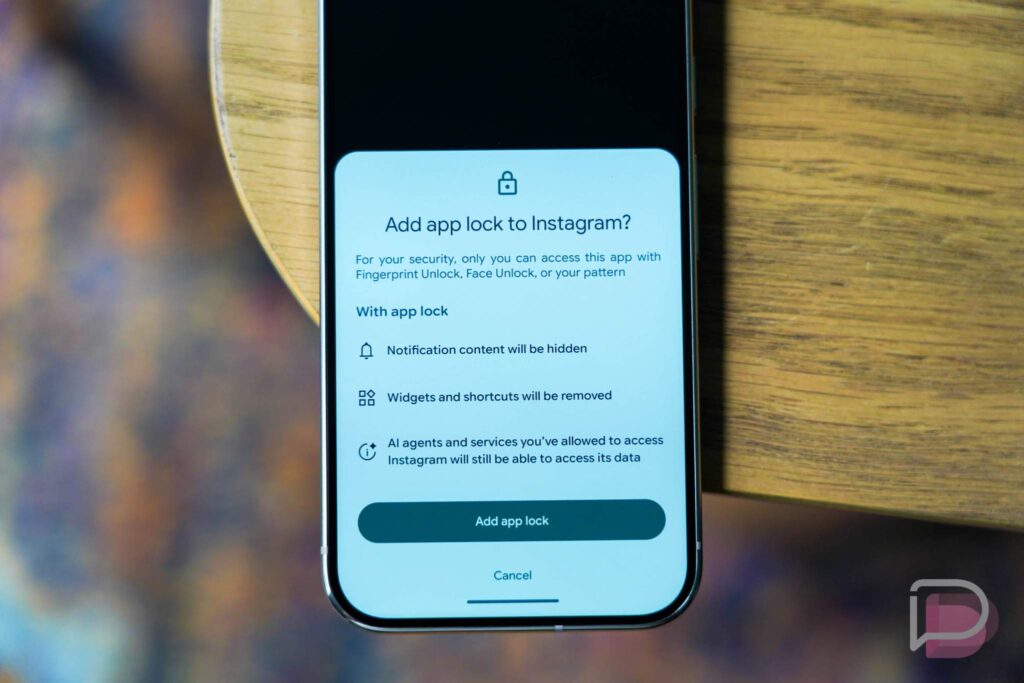
Google introduces a new App Lock feature in Android 17 QPR2 Beta 3 for Pixel phones.
Google has introduced a new App Lock feature in Android 17 QPR2 Beta 3, giving Pixel users another way to protect sensitive apps and their personal information.
The feature appeared unexpectedly in the latest beta update, which Google released on Friday. It allows users to place an additional security layer on individual apps, even when the phone itself has already been unlocked.
Once Android 17 QPR2 Beta 3 is installed, users can long-press an app icon and select the new “App Lock” option from the menu.
After an app is locked, anyone attempting to open it must authenticate again. Depending on the device and security settings, users can unlock the app with a fingerprint, face authentication or their device pattern.
The new Android 17 App Lock could prove particularly useful when someone else gains temporary access to an unlocked phone.
Without an additional layer of protection, an unlocked device can provide access to messages, photos, banking applications, social media accounts and other private information.
Google’s new feature limits that exposure by requiring authentication before a protected app opens.
Pakistan Hockey World Cup Campaign Starts With 4-1 Defeat to England
Notifications and App Shortcuts Also Change
App Lock does more than simply block access to an application.
Google says notification content from a locked app will be hidden. The feature also removes its widgets and shortcuts from areas where they could otherwise appear.
That means information from a protected application should be less visible even when the app itself remains locked.
There is one notable exception. AI agents and services that users have already authorised to access a locked application can continue to have that access, according to the feature description.
The new security controls are also available through Android’s Settings menu.
Users can open the relevant settings area to view their installed applications and choose which ones should receive additional protection.
The feature could be especially useful for apps containing financial information, private conversations, personal photographs or other sensitive data.
Google has not indicated that users must lock every application. Instead, the feature gives Pixel owners the option to select individual apps that require an extra level of protection.
Because the feature is currently part of Android 17 QPR2 Beta 3, its availability and behaviour could still change before a wider public release.
For Pixel users testing the beta, however, App Lock offers a practical way to keep specific applications protected even after the main phone lock has been bypassed.